Showing posts with label Facebook. Show all posts

Thursday, 12 July 2018

How to Add the Facebook "Like" Button to Blogger or WordPress

How to Add the Facebook "Like" Button to Blogger or WordPress

Facebook is currently the largest social media network on the Internet. Odds are your readers have a profile and can immediately start sharing your content with their friends and family. So, how can you get your readers to sing your praises without begging them to do so? Simple. Install the Facebook “Like” button on your blog.

When visitors to your blog click the "Like" button on your post, they share your content on their Facebook wall—instant advertising. You want more readers, more site traffic, and more exposure? This is a great way to do it.

Facebook Like Button

Thankfully, Facebook has made adding the "Like" button to a webpage incredibly user friendly. You don’t need to be coding guru to install this!

For Blogger Users

  1. Open your blog's dashboard.
  2. Click on Template.
  3. Click on Edit HTML.
  4. Click on Proceed when a warning telling you that "Directly editing HTML may affect the way some features work and is only recommended for advanced users." is displayed.
  5. Check Expand Widget Templates.
  6. Find this code using your browser's find function "<div class='post-body entry-content'>"
  7. Copy and paste the code given below right after it.
  8. <b:if cond='data:blog.pageType == &quot;item&quot;'><iframe allowTransparency='true' expr:src='&quot;http://www.facebook.com/plugins/like.php?href=&quot; + data:post.url + &quot;&amp;layout=standard&amp;show_faces=false&amp;width=100&amp;action=like&amp;font=arial&amp;colorscheme=light&quot;' frameborder='0' scrolling='no' style='border:none; overflow:hidden; width:450px; height:40px;'/></b:if>
  9. Click on Save Template.

Facebook Like
For WordPress

The three ways to add the Facebook “Like” button to your blog are:
1. Going directly to Facebook
2. Using a plugin
3. Manual coding

Going Directly to Facebook

Facebook has its own tool for creating a Like button using Extended Facebook Markup Language (XFBML). The Like button creation page can be found at Facebook's Developers page.

Benefits:
  1. XFBML was developed to work specifically with Facebook so it has some great bells and whistles, including real-time reports on when users click the Like button and providing users with the ability to add comments when clicking the button.
  2. The knowledge that your code will be correct.

Using a WordPress Plugin

WordPress Plugins are strings of code that have been created to expand the functionality of the software application. You can choose from hundreds of different WordPress plugins to add a Facebook Like button to your blog. The best approach is to review the documentation and user ratings of a plugin before adding it to your blog. However, keep in mind that a 3rd party plugin may limit the customization you can apply to the appearance and location of the Like button on your site. One such plugin can be found here.

Facebook Like WordPress Plugin

Benefits:
  1. Don’t have to deal with code at all.
  2. Depending on the plugin you choose, the Like button could be bundled with a number of other social buttons, minimizing the amount of time and effort you have to put into tracking down buttons for each service you want to connect to.

Manual Coding

If you have experience with PHP code editing, you can manually add the Facebook Like button to your WordPress blog. If you don’t know how to enter code but would like to learn how, WPBeginner has an excellent tutorial.

Benefits:
Offers the most control and customization of how buttons/social information displays.

All bloggers should consider installing the Facebook Like button on their blog. It doesn’t take any longer than 20 minutes to install, and it provides a quick and easy way for your readers to share your content.

Facebook's Recent Updates: Trying to fight off Google Plus

Gone are the days that Facebook was only available to college students. More and more people are joining daily and it seems the average age range is spanning in both directions. Users are now creating profiles at younger and older ages than ever before. So when it comes to social media, Facebook is king right? Well they are sure putting up one heck of a fight to stay on top.


Facebook vs Google Plus

Most recently, Google Plus had come along the social network scene giving Facebook a run for its money. What seems to attract many people to Google Plus is that it's the “shiny new toy,” so to speak and it seems to be more simplistic, and perhaps more intuitive, in its layout. As a result of these factors, Google Plus appears to be drawing in more users than other social media networks and really, should we be surprised? It seems Google has got a handle on doing a thing or two right when it comes to gaining a following.

So is this the beginning of the end for Facebook? Will it be similar to what Facebook did to MySpace?

Well, Facebook has been noticing this brand new social network rising up from the shadows, and as its result, it seems to be stepping up its game by creating some recent updates that will possibly fight back against its social media rival. Get ready ladies and gentlemen, the boxing gloves are on.

Google Plus Facebook Like

One of the most notable recent Facebook updates planned is the addition of an online video chat feature by adding the Skype Online Chat client function. While Google Plus also has this feature with multiple people chatting in one conference, Facebook plans to allow only two people converse in a video chat. Is this a strength or a weakness? It’s likely that time will tell when the results begin filling in. Many people are hoping that Facebook will raise the cap amount to more than two people in a single conference. While it hasn't been announced that Facebook is planning to raise the amount anytime soon, I guess only time will tell.

Another recent update is that Facebook has also added another new feature called Group Chat.

With the Group Chat feature, users can send a private message to as many friends or family that they want to communicate in a group without either starting up a new message for each friend or family member or even having to sign into Facebook's Instant Message feature. The Group feature is also great for starting up meeting appointments and many other tasks. This brand new feature has become a very popular and most used accessory in this social media platform to many.

Google Plus
These two updates seem to be the only real effective and recent updates that Facebook has announced, but as each day passes, it appears that Google Plus is beginning to dominate the competition altogether.

While Google Plus is slowly planning on adding new features in the possible future, who knows how the war between Facebook and Google Plus will really go down. But then again, don’t we all appreciate seeing an epic battle every now and again.

Facebook's Recent Updates: Trying to fight off Google Plus

Gone are the days that Facebook was only available to college students. More and more people are joining daily and it seems the average age range is spanning in both directions. Users are now creating profiles at younger and older ages than ever before. So when it comes to social media, Facebook is king right? Well they are sure putting up one heck of a fight to stay on top.


Facebook vs Google Plus

Most recently, Google Plus had come along the social network scene giving Facebook a run for its money. What seems to attract many people to Google Plus is that it's the “shiny new toy,” so to speak and it seems to be more simplistic, and perhaps more intuitive, in its layout. As a result of these factors, Google Plus appears to be drawing in more users than other social media networks and really, should we be surprised? It seems Google has got a handle on doing a thing or two right when it comes to gaining a following.

So is this the beginning of the end for Facebook? Will it be similar to what Facebook did to MySpace?

Well, Facebook has been noticing this brand new social network rising up from the shadows, and as its result, it seems to be stepping up its game by creating some recent updates that will possibly fight back against its social media rival. Get ready ladies and gentlemen, the boxing gloves are on.

Google Plus Facebook Like

One of the most notable recent Facebook updates planned is the addition of an online video chat feature by adding the Skype Online Chat client function. While Google Plus also has this feature with multiple people chatting in one conference, Facebook plans to allow only two people converse in a video chat. Is this a strength or a weakness? It’s likely that time will tell when the results begin filling in. Many people are hoping that Facebook will raise the cap amount to more than two people in a single conference. While it hasn't been announced that Facebook is planning to raise the amount anytime soon, I guess only time will tell.

Another recent update is that Facebook has also added another new feature called Group Chat.

With the Group Chat feature, users can send a private message to as many friends or family that they want to communicate in a group without either starting up a new message for each friend or family member or even having to sign into Facebook's Instant Message feature. The Group feature is also great for starting up meeting appointments and many other tasks. This brand new feature has become a very popular and most used accessory in this social media platform to many.

Google Plus
These two updates seem to be the only real effective and recent updates that Facebook has announced, but as each day passes, it appears that Google Plus is beginning to dominate the competition altogether.

While Google Plus is slowly planning on adding new features in the possible future, who knows how the war between Facebook and Google Plus will really go down. But then again, don’t we all appreciate seeing an epic battle every now and again.

Facebook's Recent Updates: Trying to fight off Google Plus

Gone are the days that Facebook was only available to college students. More and more people are joining daily and it seems the average age range is spanning in both directions. Users are now creating profiles at younger and older ages than ever before. So when it comes to social media, Facebook is king right? Well they are sure putting up one heck of a fight to stay on top.


Facebook vs Google Plus

Most recently, Google Plus had come along the social network scene giving Facebook a run for its money. What seems to attract many people to Google Plus is that it's the “shiny new toy,” so to speak and it seems to be more simplistic, and perhaps more intuitive, in its layout. As a result of these factors, Google Plus appears to be drawing in more users than other social media networks and really, should we be surprised? It seems Google has got a handle on doing a thing or two right when it comes to gaining a following.

So is this the beginning of the end for Facebook? Will it be similar to what Facebook did to MySpace?

Well, Facebook has been noticing this brand new social network rising up from the shadows, and as its result, it seems to be stepping up its game by creating some recent updates that will possibly fight back against its social media rival. Get ready ladies and gentlemen, the boxing gloves are on.

Google Plus Facebook Like

One of the most notable recent Facebook updates planned is the addition of an online video chat feature by adding the Skype Online Chat client function. While Google Plus also has this feature with multiple people chatting in one conference, Facebook plans to allow only two people converse in a video chat. Is this a strength or a weakness? It’s likely that time will tell when the results begin filling in. Many people are hoping that Facebook will raise the cap amount to more than two people in a single conference. While it hasn't been announced that Facebook is planning to raise the amount anytime soon, I guess only time will tell.

Another recent update is that Facebook has also added another new feature called Group Chat.

With the Group Chat feature, users can send a private message to as many friends or family that they want to communicate in a group without either starting up a new message for each friend or family member or even having to sign into Facebook's Instant Message feature. The Group feature is also great for starting up meeting appointments and many other tasks. This brand new feature has become a very popular and most used accessory in this social media platform to many.

Google Plus
These two updates seem to be the only real effective and recent updates that Facebook has announced, but as each day passes, it appears that Google Plus is beginning to dominate the competition altogether.

While Google Plus is slowly planning on adding new features in the possible future, who knows how the war between Facebook and Google Plus will really go down. But then again, don’t we all appreciate seeing an epic battle every now and again.

Cool Facebook Status, Chat Tricks and Tips

Cool Facebook Status, Chat Tricks and Tips

Most of us use Facebook to interact with some of our long separated friends but that does not mean we cannot have fun on Facebook. Here is a collection of tricks, tips and Easter eggs you can use to enjoy your experience on Facebook.

Facebook Easter Eggs: Pirate Language ,Turn Facebook Upside Down

Facebook is not as famous for its Easter eggs as Microsoft, but that does not mean that Facebook's Easter eggs are not entertaining. The one which I especially find interesting is the Pirate Language trick. To enable Pirate Language in Facebook, login to Facebook, click on the down arrow at the right of the top navigation bar, click on Account Settings, click on Edit at the right of the Language option, and in the Primary Language dropdown menu, select English(Pirate) located somewhere near the bottom and be the captain of your Pirate Ship.

Facebook tricks
Blabber t' yer mates

Similarly, you can also turn Facebook upside down by selecting English(Upside Down) from the Languages dropdown. This will flip the entire Facebook interface but your status updates would still be "normal".

Facebook Tips
See. Mark Zuckerberg does know how to headstand.


Chat on Facebook in your Firefox sidebar while browsing other Websites

To do this, you need to bookmark https://www.facebook.com/login.php. Then click on Show all Bookmarks (Manage Bookmarks in older versions) in the Bookmarks menu, then locate the newly created bookmark, single click on it, then click on more in the footer, then check Load this bookmark in Sidebar. Now, you can open that bookmark in Firefox's sidebar and keep on browsing other websites too.

Facebook chat

Show Facebook Status Updates only to Specific People or Hide them from someone

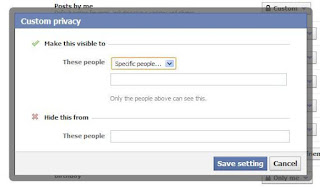
Facebook gives you the option to show your status updates to everyone or only your friends. You can further optimize Facebook so that your status updates are shown only to people you wish. Go to Privacy Settings by clicking the Settings icon at the right of the top navigation bar and clicking Privacy Settings. Then, in the Who can see my stuff? section, click on "Who can see your future posts?". Then, customize who you wish to show your posts by clicking on the down arrow that appears next to the Post button on the non-functional status update box. You can also hide your statuses from specific people by adding their name in the Hide from These section under Custom settings. You can also individually change the audience of your posts. Go to the post whose audience you wish to change and choose a different audience by clicking on the globe icon (which denotes that the post is public).

Hide Facebook Status

Hide your past posts so that only your friends can see them

Now you can also customize your past posts so that only your friends can see your past activity. To do this, open Facebook Privacy Settings and under the "Limit the Audience for Past Posts" option, select "Limit Old Posts."

Tag people in Status Updates, Wall Posts, Comments or Text

To tag someone in text in a manner that a link is created to the person's profile, use the @ symbol. eg. If you wish to tag John Jamison in your comment write @ John Jamison without any spelling mistake. If the person is in your friend list, a link in blue will be automatically created to the person's profile and he would be "tagged".
Tag Statuses Text Comments
Facebook text tagging in action


Write Upside Down, In Bubbles or Inverted Mirror-like text on Facebook

You might have seen many people update their Facebook status saying that "this was the last time they bought a keyboard on eBay" or "they have finally learnt how to update Facebook statuses while doing a headstand" written upside down. Here is how you too can flip text like that and add much more cool effects. Just go to Upside Down Text, uncheck Backwards effect, enter your text and copy the inverted one from the inverted text column and paste it in your status update or chats. You can also write inverted mirror like text by un-checking the upside down effect. To write in bubbles, click on the Bubble Ball text in the top Navigation bar.

e.g. Mirror Effect:- !rorrim a ni deppart ma I !oN hO

e.g. Upside Down Effect:- ɯɐp ʞǝʎqoɐɹp¡

e.g Both Mirror and Upside Down Effect:- ¡poפ ǝɯ dlǝH ˙ʎzɐɹɔ ƃuıʇʇǝƃ sı uıɐɹq ʎW

e.g. Text in Bubbles:- Ⓞⓗ Ⓝⓞ! Ⓜⓞⓡⓔ ⓑⓤⓑⓑⓛⓔⓢ

Why Facebook is Blue in Color?

Why Facebook is Blue in Color?

When you open Facebook, the first thing that you notice is the blue color it uses. Ever wondered why is Facebook so blue in color and not changing its color scheme?

Ever since they started as 'thefacebook', Facebook has stayed with the blue color. Although major changes have been made in the Facebook theme since then, the major unchanged thing has been the blue color.

facebook blue color
Facebook from its early days when it was known as  thefacebook

An exciting fact: In its earlier days, thefacebook.com required you to have an  .edu email id to join.

Everywhere from its login page to Facebook groups, you find only blue.

facebook is blue
Facebook Login Page. All Blue!

The reason for this is that  Mark Zuckerberg, the young founder of Facebook is red-green color-blind and blue is the richest colour for him which he confirmed in an online interview with Leo Laporte.

Another important commercial factor for using blue color is the fact that most colors tend to distract the viewers. Blue on the other hand acts as a transparent background to the main content as visible to the human brain due to which most popular websites tend to use the blue color. It can easily be called a webmaster's favorite color. Blue color is also sometimes referred to as 'Nirvana' for the brain.

All these factors make blue a prominent color on Facebook.

If you are bored with Facebook's blue theme and want a stylish theme, visit Change Facebook Theme.

Change Facebook's Theme, Color & Appearance

Change Facebook's Theme, Color & Appearance

Facebook is a social networking site which enables people to connect with friends and people around. That's how Facebook is usually introduced. However, Facebook is beyond the need of being introduced as almost everyone is on it. Despite its popularity, Facebook has one flaw; the default blue theme is really boring.

Some even consider it an annoyance while visiting Facebook. As Facebook does not allow users to change its theme like MySpace used to, users are left with no other option but to bear the theme Facebook wants them to use.

However, it is relatively easy to change the Facebook theme to a stylish one using an addon and custom themes which are available free of cost on the internet.

An example of the final outcome would be something like in the image.

Change Facebook Theme
This is the Ferrari theme. More themes are available for you to choose.


Requirement: The basic requirement for this to work is to have Mozilla Firefox or Google Chrome as your browser.

Steps to achieve this: If you use Google Chrome,  Mozilla Firefox users should carry out the following steps to successfully change Facebook theme.

  1. Open Mozilla Firefox and install 'Stylish' addon.
  2. Follow the basic steps to install the addon.
  3. Restart Firefox after successfully installing the Stylish addon.
  4. Login to your Facebook Account and click on the small 'S' button in your Firefox status bar.
  5. Click on "Find Styles for this Site" to open a new tab with free themes to use for Facebook.
  6. Click on any theme and a preview will be shown.
  7. If everything is fine in the previewed theme, click on "Install with Stylish" button at the top right corner of the page.
  8. A dialog box will open.
  9. Click on Install in the dialog box.

Steps for Google Chrome
  1. Install Stylish for Chrome from the Chrome Web Store.
  2. Navigate to Facebook.com and click on the S button.
  3. Click on "Find Styles for this Site" to open a new tab with free themes to use for Facebook.
  4. Click on any theme and a preview will be shown.
  5. If everything is fine in the previewed theme, click on "Install with Stylish" button at the top right corner of the page.

Stylish Button


facebook theme change

Install with stylish

Installing Ferrari theme for Stylish Firefox

Now whenever you open Facebook, it will show the theme that you have installed with Stylish instead of the boring old blue theme.

Download Facebook Account's Pictures and Data

Download Facebook Account's Pictures and Data

OK. So you are an active Facebook User. Imagine, just imagine, some grieved enemy of your reports your posts, and Facebook ends up deleting your account. How would you feel?
Ruined?

Well, not now. Facebook, the most popular social networking site, has a ways to tackle this situation. It does so by allowing you to download all your account information at the click of a button.

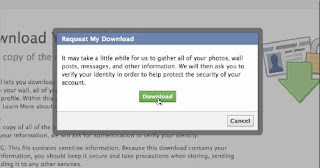
While this has been requested by users for years now, Facebook has very recently introduced the feature of downloading your Facebook account. The download is in the form of a zip file containing all your profile pictures, the photos you have been tagged in, wall posts and videos. Your messages, friend list, photos, events, likes (and almost everything you have ever uploaded on Facebook) is also included in the downloaded zip file. Upon unzipping the downloaded zip file, you will find a simple HTML file of your profile with offline links to the above stated things.

Downloading your account will not mean that Facebook will delete your profile. It will only serve as a backup and a leisure activity to give time to on Sundays.

Download Facebook Account Photo Videos

You can simply download your account by following the steps given below:-
  1. Login to Facebook.
  2. Click on the Settings icon at the right side of the top navigation bar.
  3. Navigate to Account Settings.
  4. Click on Download a copy of your Facebook data at the end of the page.

This link will only be available after Facebook has finished creating an archive of your account. They will send an email to you when the download is ready. This additional security measure has been wisely added by Facebook so that no one else downloads your personal information.

There is an expanded version of the archive that contains much more information, like the log of your Facebook login activity.

Although this is a good feature, Facebook offers no way to re-import this information from your hard drive to your account or to a new account, if you wish to create a new Facebook account containing all your old data.

Edit Websites in Browser (Live)

                                        Edit Websites in Browser (Live) Imagine a world where you are a God and have ultimate control ...

ALL POST